Mjolnir
Shape ideas into working code.
A native macOS command center for Claude Code. Iterate, refactor, and ship with a focused UI built for developers.
Design
Built for macOS. Designed for developers.
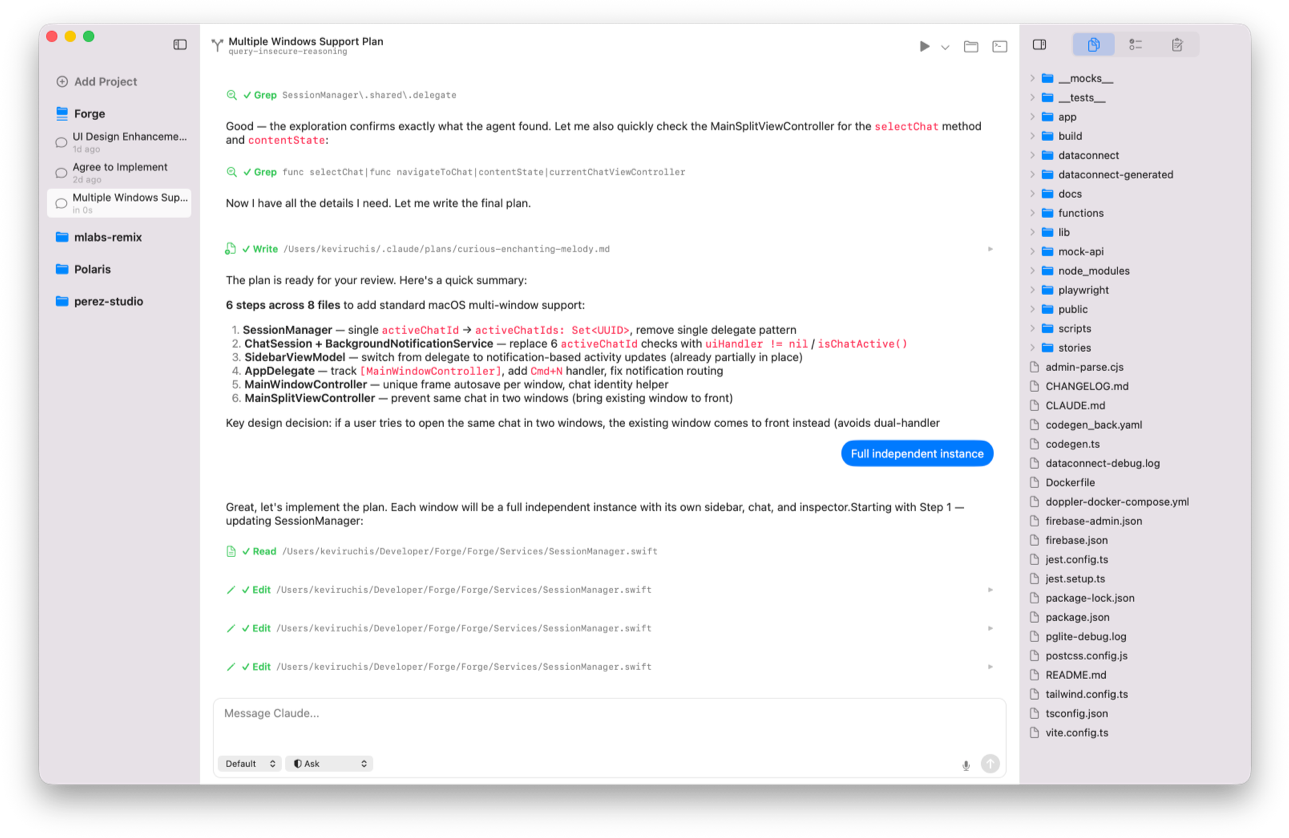
Mjolnir is designed from the ground up as a native Swift app. Every interaction feels fast, familiar, and focused. So you can work with AI without fighting your tools.
Native, not wrapped A true SwiftUI interface that looks and behaves like a Mac app. No web views, no uncanny UI—just smooth scrolling, real keyboard shortcuts, and system-level performance.
Clarity over clutter Prompts, context, and output are structured and readable. Diff-friendly views, thoughtful spacing, and typography that makes long code sessions easier on the eyes.
Designed to stay out of your way Mjolnir fades into the background when you're focused, and surfaces power only when you need it. Panels open with intent. Nothing steals attention.
Dark mode done right Carefully tuned colors and contrast for long sessions, whether you're working late or bouncing between light and dark mode all day.
Feels at home on your Mac Menu bar support, standard shortcuts, and window behavior that matches macOS conventions—because tools should respect muscle memory.
AI Engines
Code with the world's leading AI coding tools.
Mjolnir brings together the best AI coding agents into a single, unified macOS interface. Whether you prefer Claude Code's deep reasoning and long-context capabilities or ChatGPT Codex's engineering-focused workflows, Mjolnir makes it easy to switch, compare, and combine what each model does best.
Claude Code Built for deep reasoning, large refactors, and long-context analysis. Claude Code shines when you need to understand complex systems or reshape entire projects with confidence.
ChatGPT Codex Optimized for practical engineering tasks, fast iteration, and command-style outputs. Codex is ideal for prototyping, scripting, and day-to-day development work.
Support Coming in Summer 2026
Unified Interface No matter which engine you're using, the experience stays consistent. The same layout, controls, and workflows apply across models—so you focus on code, not tools.
Clear Model Context Every run is explicit. Mjolnir shows exactly which AI engine is active, what context is included, and how your code is being interpreted—no hidden behavior, no surprises.
Dev Tools
Your favorite tools, connected and powerful.
Coding isn't just writing text — it's running, testing, reviewing, and shipping. Mjolnir understands that.
Run Configurations & Task Profiles Save and reuse complex workflows, environment setups, and prompt contexts so you never lose mental flow.
Built-in Terminal A native terminal lets you run commands, test code, and interact with your project without switching apps.
Support Coming in Summer 2026
Git Support View AI-suggested changes side-by-side with your code history, stage and commit with confidence, and approve suggestions with clear visual diffs.
Integrated Debug/Output Panels See results, logs, test outcomes, and performance metrics — all in one place.
Security
Protect your code, your context, and your peace of mind.
We take security and privacy seriously, because your code isn't just text, it's trust.
Local context handling Your project files and back-and-forth context stay on your machine until you choose otherwise.
Explicit API control Use your own API keys for Claude Code, Codex, or any supported model; no shared credentials required.
Support Coming in Summer 2026
Secure token management Mjolnir never stores keys in plaintext — encrypted storage and macOS keychain integration keep sensitive data safe.
Why Native?
Designed from the ground up for macOS.
Web-based tools are great for browsing, but heavyweight workflows deserve a real Mac app.
Native, not wrapped A true SwiftUI interface that looks and behaves like a Mac app. No web views, no uncanny UI—just smooth scrolling, real keyboard shortcuts, and system-level performance.
Clarity over clutter Prompts, context, and output are structured and readable. Diff-friendly views, thoughtful spacing, and typography that makes long code sessions easier on the eyes.
Support Coming in Summer 2026
Designed to stay out of your way Mjolnir fades into the background when you're focused, and surfaces power only when you need it. Panels open with intent. Nothing steals attention.
Dark mode done right Carefully tuned colors and contrast for long sessions, whether you're working late or bouncing between light and dark mode all day.
Feels at home on your Mac Menu bar support, standard shortcuts, and window behavior that matches macOS conventions—because tools should respect muscle memory.